
Video Guide: Building Grok Bots
Build an always-on Grok Bot team: context first, then connections, skills, and cadence. Jump into the source video when you want the live demo.
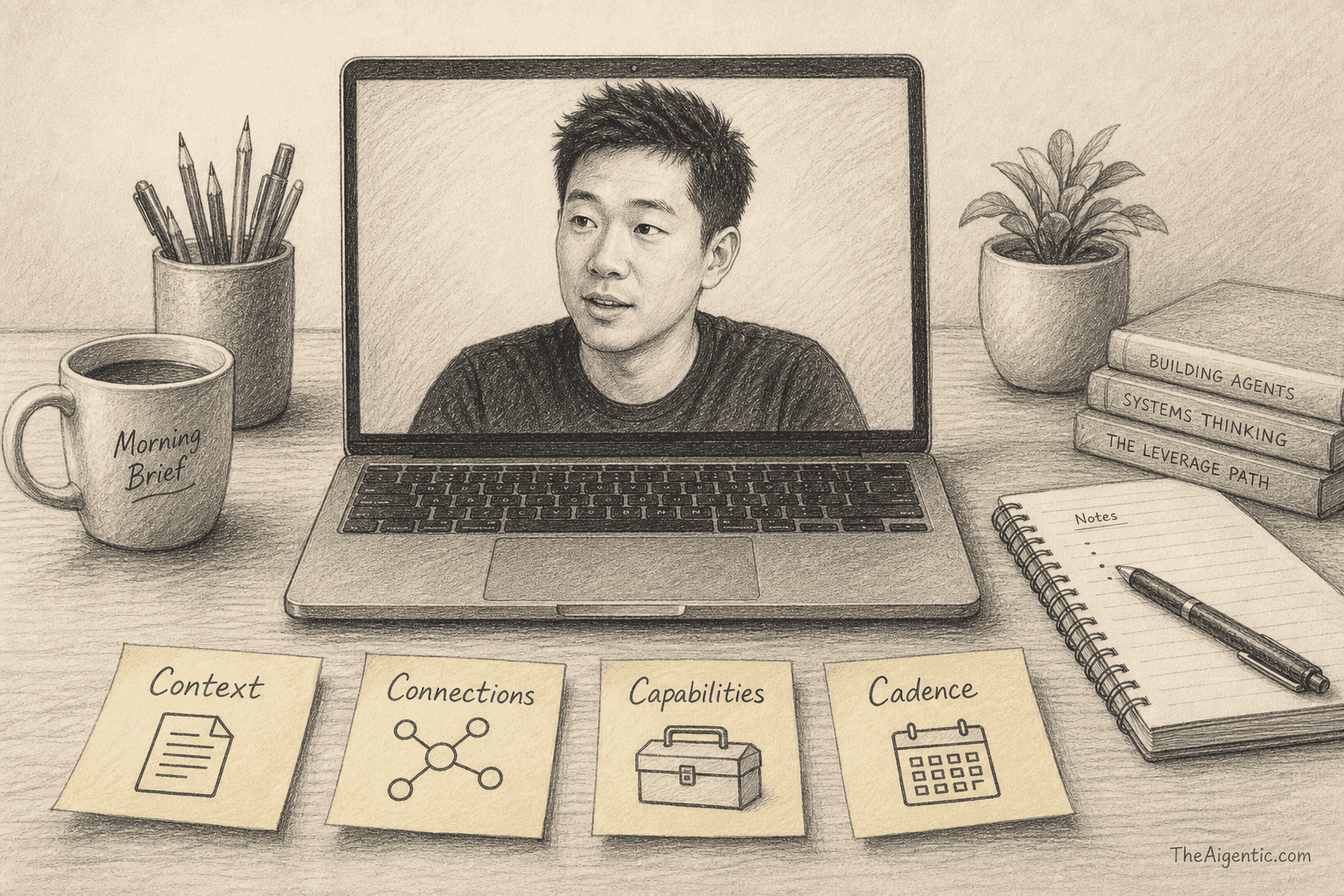
This is a working playbook for standing up a Grok Bot team: a chief of staff, narrow specialists, skills, routines, and a clean approval boundary. It is based on Nate Herk | AI Automation’s Build & Sell Grok Bots (2 Hour Course) (Aug 31, 2026). Credit lives here and in Sources; the steps below are written so you can build, not so you can rewatch by paragraph.
Companion reading: Hands On: Grok Bot, Nine Grok Bot Routines, and the Agents map.
Sandbox option: the source demo uses a fictional HVAC shop (“Summit Home Services”). Use that as a throwaway company, or swap your real business in from step one.
Jump in the video
| Topic | Jump |
|---|---|
| What Grok Bot can do | 0:00 |
| Building your agent team | 6:00 |
| The Four Cs framework | 9:24 |
| Complete Grok Bot setup | 12:05 |
| Adding business context | 15:09 |
| Building an inbox agent | 19:43 |
| Feedback loops & skills | 30:00 |
| Usage, browser control & verification | 38:17 |
| Multi-agent delegation | 43:44 |
| Logging work in ClickUp | 50:16 |
| Teams, channels & shared memory | 55:25 |
| More connections with Composio | 1:00:18 |
| Building a video agent | 1:04:43 |
| Shared files & context | 1:08:24 |
| Automating meeting transcripts | 1:14:34 |
| Building an AI marketing team | 1:18:24 |
| Slack-triggered routines | 1:26:41 |
| Sending outputs to other tools | 1:32:11 |
| Sharing bot templates | 1:34:28 |
| Selling Grok Bot services | 1:38:57 |
| Final thoughts | 1:45:22 |
Operating rules
Hold these before you connect plugins or schedule anything (6:00):
- One agent, one job. Specialists stay narrow. A flat swarm of “do everything” bots duplicates work and leaves holes.
- You talk to leadership; leadership delegates. Pin a small executive suite. Day to day, message a chief of staff — not twelve inboxes.
- Drafts before send. On email and customer replies: draft, label, watch, and grant send only after you trust the voice.
- Outsource the thinking, not the understanding. Let agents propose labels, SOPs, and new bots. You still decide what ships.
Split your tool stack the same way: Claude Code / Codex-style harnesses for desk production work; Grok Bot for always-on teammates that keep moving overnight, on your phone, and on event triggers. Use both.
The Four Cs
Treat Grok Bot as an AI operating system with four layers (9:24):
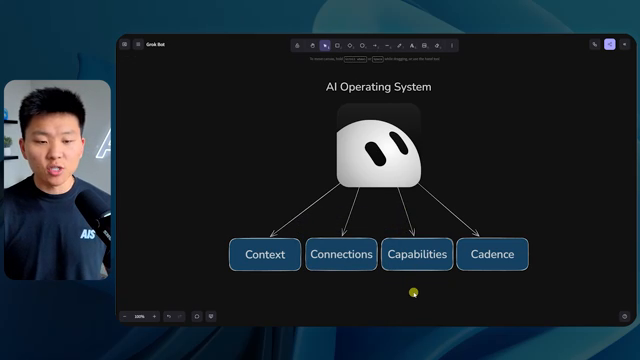
Frame from the source video (9:24).
| C | Meaning | What to put there |
|---|---|---|
| Context | Who you are, what the business is, goals, voice, constraints | Seed docs in Drive; a clear chief-of-staff description; pricing / FAQ |
| Connections | Live access to tools (read and act) | Gmail, Drive, ClickUp, Slack, Calendar, Composio bridges |
| Capabilities | Skills / SOPs that combine context + connections | “Log to ClickUp,” triage playbooks, verified browser workflows |
| Cadence | Routines — schedule or event triggers | Inbox watch, Slack keyword routines, Sunday archive |
Order matters. Connections without context produce confident nonsense. Skills without connections can’t execute. Cadence without a verified skill just automates failure.
Org chart: you → executives → operators
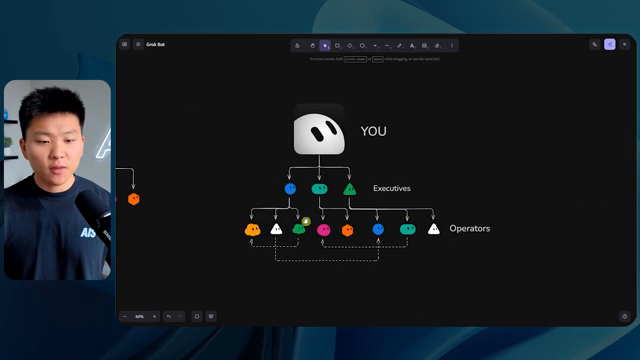
Frame from the source video (6:00).
Avoid one mega-agent that “owns” everyone. Prefer this shape:
- Talk mainly to a few executives.
- Give each executive a vertical.
- Put operator agents under them for one specific job each.
- Write descriptions so other agents can read who owns what and route correctly.
- Let operators message peers for data, then return to their lane.
A strong chief-of-staff description: before doing any task, check whether another bot owns it and delegate first; only do the work yourself if no specialist fits, then bring the result back.
Step 1: Stand up the account and pin your Friend
(12:05)
- Install Grok Bot and sign in with an eligible plan (get started).
- Create your first durable bot — a chief of staff (call it Friend or another human name). Give it a title/label and a description that states scope and the “delegate first” rule.
- Pin that bot. As the roster grows, this is the one you open by default.
- Confirm you can see its computer / browser surface, plugins, and routines UI — those three surfaces are where the Four Cs live.
Create with New → Create new agent, then edit profile (name, title, description). Keep the suite small on purpose (Bots).
Step 2: Pour in context before you connect tools
(15:09)
Start with a source of truth, not with Gmail:
- Write (or generate) a short business brief: what you sell, who you serve, pricing, policies, voice, hard no’s.
- Put it somewhere durable the bots can reopen — Drive folder, docs, or shared files on the Grok Bot computer.
- Tell Friend that folder/doc is canonical. Prefer “look it up” over stuffing every fact into memory forever.
- Correct stale assumptions in chat, then promote lasting rules into the description.
Context is what makes later drafts sound like your company instead of a generic helpdesk.
Step 3: Add connections — then build the first specialist
(19:43)
Plugins are how connections show up. Label each account clearly if you connect more than one. Calendar is separate from Drive — don’t assume one Google auth covers every surface.
Build an inbox agent
- Ask Friend to create a dedicated email agent instead of owning triage itself.
- Let Friend brief the new agent: business context, pricing, triage rules, source-of-truth links, and “don’t send until I say so.”
- Authorize Gmail for that specialist; label the plugin.
- Ask the inbox agent to read the mailbox and recommend a plan — labels, watches, draft habits — then you approve.
- Start with drafts + labels + a watch routine. Emergencies can ping you; everything else waits for a morning list.
- Only after the drafts look right do you allow sends.
A solid label structure for a service business: Emergency, Needs you, Quote, Schedule, Billing, Warranty. Steal the shape: urgency first, money fights second, FAQ-able replies drafted from docs, noise ignored.
Pro tip: if one label explodes in volume later (refunds), promote it to its own specialist under the same executive.
Step 4: Turn good work into skills, then into cadence
Skills are reusable SOPs. Routines are when those SOPs fire.
- Do the job once in chat until the output is actually good.
- Give crisp feedback (“always use this sign-off,” “never task the 30-minute heartbeat”).
- Ask the bot to save the pattern as a skill.
- Only then attach a routine (every N minutes, weekday morning, Slack keyword, etc.).
- Use Test run, inspect history, pause or delete noisy routines.
When a bot claims it did something in the browser or a third-party app, open the computer view and check. Verification is part of Capabilities.
Official vocabulary: Skills, routines, and automations.
Step 5: Delegate across agents and keep a work log
Once Friend can hand work to Inbox, extend the same pattern:
- New durable job → new specialist (or ask Friend to propose one).
- Friend messages the specialist with a brief; stay out of the middle unless needed.
- Log meaningful projects in ClickUp (or your tracker): owner, agents involved, status, due date, links.
- Turn “log to ClickUp” into a skill so you stop typing the reminder.
- Don’t create a task for high-frequency heartbeat routines — archive that noise and teach the skill.
The board is for weekly visibility: what moved, what’s stale, whether you’re actually using the army you built.
Step 6: Channels, shared memory, and more connections
- Sections in the sidebar keep verticals collapsed (sales, marketing, general).
- Channels (group chats) are for leadership ideation and “all hands” asks — better than pinging six DMs.
- Memory: executives should know a lot about you; operators need job-scoped knowledge. Shared computer files and plugins are the durable layer.
- Composio (and similar bridges) extend beyond native plugins when you need YouTube, LinkedIn, Reddit, or similar surfaces. Document in shared context that Composio is the path, so every bot knows where to look.
Step 7: Content, meetings, and event-driven cadence
Same Four Cs pattern, applied to other jobs:
Video / marketing team (1:04:43 · 1:18:24)
Stand up a content executive, then operators for research, scripting, design, and video tooling. Feed them brand context and examples. Share files on the computer so specialists aren’t re-uploading the same assets.
Meeting transcripts (1:14:34)
Connect Fireflies (or your note taker), give one agent ownership of “new transcript → summary + actions → handoffs,” then cadence it so follow-ups don’t wait for you to remember.
Slack-triggered routines (1:26:41)
When the work is event-shaped — a keyword in Slack, a handoff message — prefer a trigger over polling every 30 minutes. Route the output somewhere useful (ClickUp, Drive, email draft), not only back into chat (1:32:11).
Step 8: Share templates — then decide if you’ll sell setups
Templates: strip secrets, customer data, and private URLs before you share a bot. Recipients get a copy of the configuration (identity, description, skills, routines) — not your computer, logins, or history (share behavior in docs).
If you sell setups: treat education as a foot-in-the-door. A practical ladder is free help → hourly teaching → paid audits → fixed projects → retainers. Earn each rung. Run the Four Cs stack yourself first so the demo is lived proof. When you pitch, teach Context / Connections / Capabilities / Cadence as the operating system, and define the ICP with a simple lens: Person, Pain, Promise.
Confirm current Super Grok and third-party pricing in-product before you buy or sell. On-camera dollar figures in the source video are examples, not a rate card.
What to build this week
- Pin a Friend with a delegate-first description.
- Drop a real business brief into Drive (or shared files) and point Friend at it.
- Create one Inbox (or calendar / Slack) specialist — drafts only.
- Save one skill from a job you already like.
- Attach one routine you have watched succeed manually.
- Open a leadership channel only when a second executive exists.
- Optionally package the stack as a template once secrets are gone.
Standing morning jobs and copy-paste routine prompts: Nine Grok Bot Routines. Multi-creator setup path: Hands On: Grok Bot.
Sources & attribution
Primary source
- Nate Herk | AI Automation — Build & Sell Grok Bots (2 Hour Course), Aug 31, 2026 · Nate Herk channel
Frameworks and patterns above (Four Cs; executive / operator org; inbox drafts-before-send; ClickUp logging; Composio; Slack triggers; templates; service ladder; Person / Pain / Promise) are drawn from that course. Diagram frames are screenshots from that video.
Related on The Aigentic
Product facts confirmed against Get started, Bots, Skills, routines, and automations, and x.ai/bot.