
Claude Duet vs. Muse vs. Dots vs. Grok Bot: Which Personal Agent Should You Use?
A practical guide to choosing your first personal agent, with current access, pricing and four assignments you can try this week.

Start with the job you want off your plate. If that means family logistics and everyday errands, Muse is the first one we would try. If it means keeping a project moving inside ChatGPT, Dots deserves a look. Grok Bot suits people who want to build repeatable workflows around named assistants. And if you already rely on Claude for work, the new Duet is a natural candidate once you can get access.
Anthropic introduced Claude Duet on October 21, adding another contender to the race for an assistant that keeps working between conversations. Its pitch is especially relevant to professionals and small business owners: spot what needs attention, prepare the next step and bring back the decisions that need you. 1
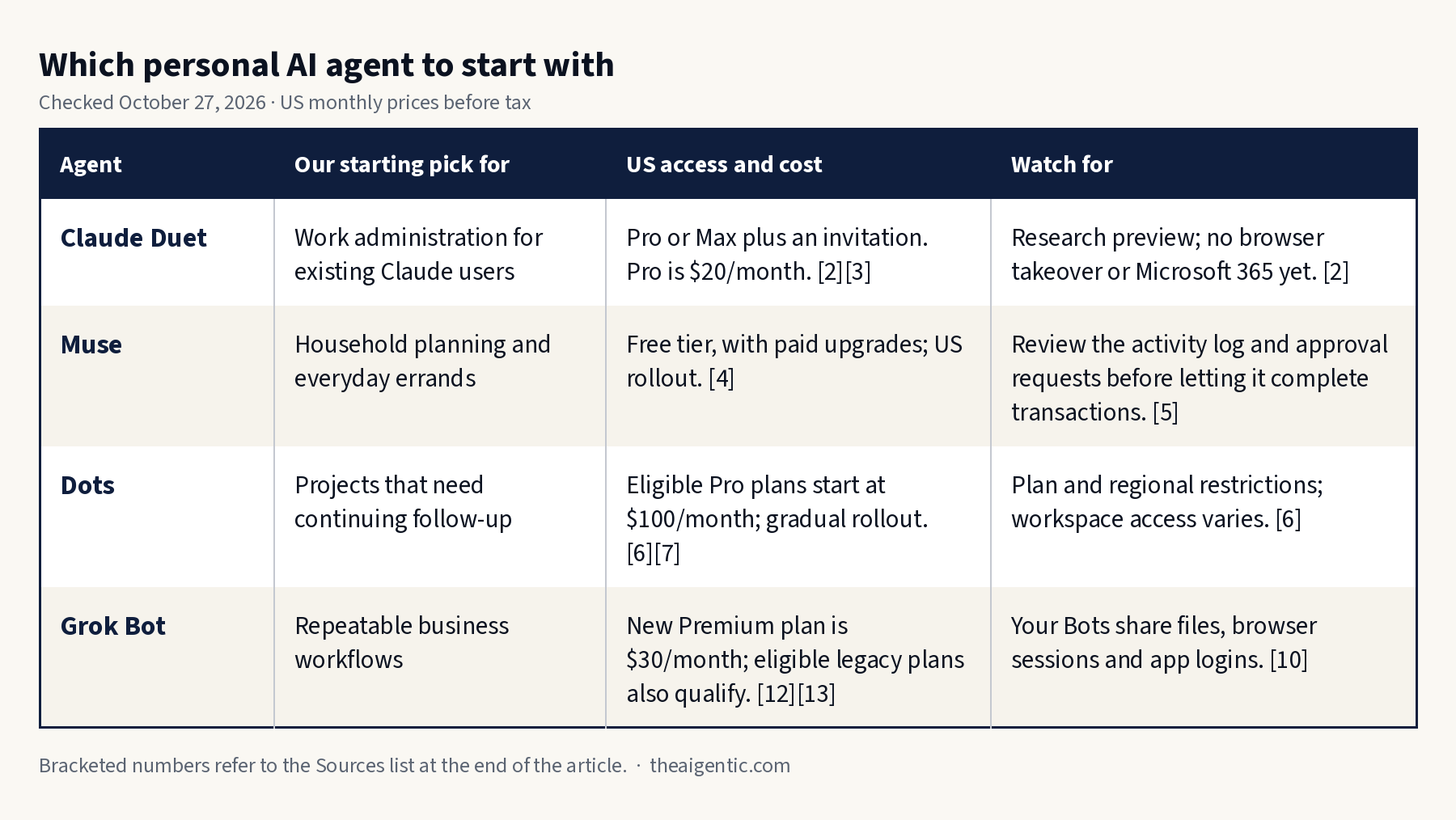
The useful comparison is how each agent fits your tools, budget and willingness to supervise. Here is where we would start.
Pick by the work you want done
Checked October 27, 2026. Prices are US monthly subscription prices where listed, before applicable taxes. These are recommendations by use case, based on documented capabilities.
| Agent | Our starting pick for | US access and cost | Watch for |
|---|---|---|---|
| Claude Duet | Work administration for existing Claude users | Pro or Max plus an invitation. Pro is $20/month. [2] [3] | Research preview; no browser takeover or Microsoft 365 yet. [2] |
| Muse | Household planning and everyday errands | Free tier, with paid upgrades; US rollout. [4] | Review the activity log and approval requests before letting it complete transactions. [5] |
| Dots | Projects that need continuing follow-up | Eligible Pro plans start at $100/month; gradual rollout. [6] [7] | Plan and regional restrictions; workspace access varies. [6] |
| Grok Bot | Repeatable business workflows | New Premium plan is $30/month; eligible legacy plans also qualify. [12] [13] | Your Bots share files, browser sessions and app logins. [10] |
Tap to enlarge.
Claude Duet for work already happening in Claude
Duet is the most interesting new option for someone who has already taught Claude how they work. It carries over Claude memory, skills and connected apps, and works on its own cloud computer. Anthropic describes morning briefs, attention to changes in connected services, and tasks ranging from scheduling to building dashboards. Those capabilities make it a plausible place to consolidate the work you currently hand to Claude one request at a time. 1
Get started: Join the waitlist from the Duet product page using your Claude account email. Access requires a US Pro or Max account and an invitation. Follow the invitation’s installation steps, then begin with the email and calendar connections you need. Team and Enterprise plans are not included yet. 2
During the preview, Duet has no separate fee, but background work consumes the same plan limits as your other Claude activity. Pro costs $20 when billed monthly; buying it does not guarantee immediate Duet access. 2 3
Try this first
Review the last seven days of my connected work email and my calendar for the next three days. Find the five commitments most likely to need my attention. For each, show the source, deadline and next step. Draft any useful replies for review. Ask before sending messages or changing my calendar.
Check the first result against commitments you already know about. Did Duet identify the client waiting for a decision, or simply elevate the loudest email? Correct its priorities before asking for a recurring brief.
The limitation that could decide it: Duet’s current help page says Microsoft 365 is unavailable in the preview, and you cannot watch or take over its browser. It checks accounts at intervals, so urgent messages may wait for the next check. If Outlook is central to your day, or visible browser control is essential, those are substantial reasons to wait. 2
Watch Alex Finn’s Duet video: If you use AI, download Claude Duet immediately
Muse for everyday errands and family logistics
Muse is our first recommendation for a reader who wants to try a personal agent without committing to another paid subscription. Meta offers a free tier, with paid plans for more use. You can communicate in the Muse app or through WhatsApp, and its cloud computer can keep working after you close the app. Meta’s examples emphasize shopping, travel and the small administrative jobs that fill a day. 4
Get started: Use Meta’s official Muse page to reach the product. Give it one bounded household job and connect only the accounts required for that task. Start with a proposed plan you can check.
Try this first
Use these school emails and the calendar I connected to prepare a plan for the next seven days. List forms due, items to buy and events that conflict. Link each item to its source. Make a shopping shortlist with total prices, but ask before purchasing anything or adding calendar events.
A useful result makes it easy to see whose event it is, when the form is due and which email changed the date. Inspect those details before relying on the plan. Muse’s design includes an activity log, a Goals view and editable memory, which give you places to review what it is doing and what it has learned. 5
For privacy settings, Meta says Muse conversations and VM data are not shared with its advertising systems; it also offers an opt-out from using interactions to train its models. Check that choice during setup. 4
Choose Muse when the main goal is reducing personal administration. Let a successful week of errands justify a paid upgrade.
Dots for a project that keeps changing
Dots is a strong candidate for people who already do substantial work in ChatGPT and want an agent to keep track of an ongoing responsibility. A dot can use its cloud computer, follow up between conversations and delegate work to ChatGPT Work or Codex. It also lets you inspect and take over its cloud browser. 6
Check access first: Individual eligibility currently lists Pro 100, Pro 200 and Pro 500 for users over 18 outside the EEA, UK and Switzerland. Pro starts at $100 per month. Business Premium and Enterprise are rolling out worldwide; Enterprise requires an administrator to enable Dots. Eligibility does not guarantee immediate availability. 6 7
Get started: Open Dots in the ChatGPT mobile app, desktop app or a desktop browser. Name your dot, connect the relevant plugins and give it one project with a clear finish line. Connecting your own computer is optional; local work requires that computer to remain online with ChatGPT open. 8
Try this first
Help me keep this website launch on track for the next seven days. Use the launch checklist and the connected project channel to track open decisions, owners and deadlines. Each weekday at 4 p.m. Eastern, report changes that threaten Friday’s launch, with sources and proposed next steps. Confirm the schedule. Ask before posting to colleagues or changing shared files.
You can reach your dot through Slack or Teams, but connecting a messaging channel and connecting the tools it needs are separate steps. Adding it to a channel does not automatically establish a monitoring schedule. 9
The value case is strongest if you already have an eligible plan and a project worth following. At the current individual entry price, a single daily email summary would be a thin reason to upgrade.
Grok Bot for work you want to repeat
Grok Bot is our starting pick for someone who likes assigning clear jobs to separate assistants: one for research, another for operations, another for a recurring report. Bots retain their roles and context, coordinate with one another and use a persistent cloud computer. That structure suits a small business with several repeatable processes. 10
Get started: Create one Bot, describe its responsibility and connect the tools it needs. Give it a complete one-time assignment. When the result is reliable, save the method as a skill and ask for a routine with a specific schedule and time zone. 10 11
Try this first
Compare the current pricing and product pages for these three competitors with the copies I supplied from last week. Report only meaningful changes, with a link and date for each. Separate confirmed changes from anything uncertain. Return a short brief and a comparison table. Do not contact the companies or publish the result.
After checking the output, ask it to repeat the process weekly and preserve a dated comparison. This is where the named Bot becomes useful: the job has a defined scope, repeatable inputs and an output you can verify.
Check your existing subscription: New customers can get Grok Bot through The X Subscription’s Premium tier at $30 per month or above. Eligible legacy Cursor plans and linked subscriptions can also provide access. The current billing guide distinguishes these routes; on the new subscription, Grok Bot draws from a shared weekly usage pool. 12 13
One important boundary: Your personal Bots share the account’s cloud computer, including files and signed-in sessions. Separate Bot names organize responsibilities; they do not isolate access. Keep that in mind before combining sensitive personal work with business research. 10
Give your choice a one week trial
Pick one agent, or two you can already access, and test a job you understand well. Use the same source material and definition of success if you compare two. You will learn more from a missed deadline in familiar work than from an impressive answer to an unfamiliar question.
- Days one and two: Run the starter assignment once. Open its source links, check dates and totals, and correct any wrong assumptions. Keep a record of how much checking it needed.
- Day three: Introduce a real change, such as a moved deadline or revised quote. See whether it updates the plan and identifies the consequence.
- Days four through six: Ask it to repeat the proven task. Confirm the schedule, time zone and end date. Check that a run actually completed.
- Day seven: Review completed work, mistakes requiring correction, time spent supervising, unnecessary interruptions and any extra usage charges. Cancel trial routines you will not keep.
For this first week, use the product’s permission controls to keep sending, purchasing, deleting and publishing subject to review. Include the same boundaries in the assignment. Judge the approval request too: it should be clear what will happen, to whom, and with which information.
A useful measure is the time the job normally takes minus the time you spent instructing, checking and repairing the agent’s work. Treat that as your own measured result. Neither a polished response nor an enthusiastic video tells you how much time your particular workflow will save.
Start with Muse if cost is the biggest obstacle. Try Duet when your work already lives in Claude and an invitation arrives. Consider Dots when ongoing project follow-up can justify the eligible plan. Choose Grok Bot when you want to turn a proven process into a repeatable job. After a week, keep the one that finishes useful work with an acceptable amount of checking.
Watch and read next
For another perspective, watch The AI Advantage’s My Honest Take on Muse, Grok Bot, Dots & Duet.
Continue with The Aigentic’s Muse guide to ten everyday chores and Grok Bot guide to its expanding capabilities.
Reporting note: This guide compares documented capabilities, pricing and access as of October 27, 2026. The prompts and one-week plan are suggested reader trials, not reported benchmark results.
Sources
- Anthropic — Introducing Claude Duet
- Anthropic — Get started with Claude Duet
- Anthropic — Claude pricing
- Meta — Introducing Muse
- Meta — How We Designed Muse
- OpenAI — Meet dots and access requirements
- OpenAI — ChatGPT pricing
- OpenAI — Get started with your dot
- OpenAI — Message your dot
- Grok Bot — Overview and shared computer
- Grok Bot — Skills and routines
- Cursor — Grok Bot plans and billing
- SpaceXSI — The X Subscription pricing