Run DeepSeek V4.1 Flash Yourself: Desktop, API, or Free Trial
You can put DeepSeek to work without buying a desktop AI cluster. Here are three routes into the model—and the tradeoffs that determine which one makes sense.
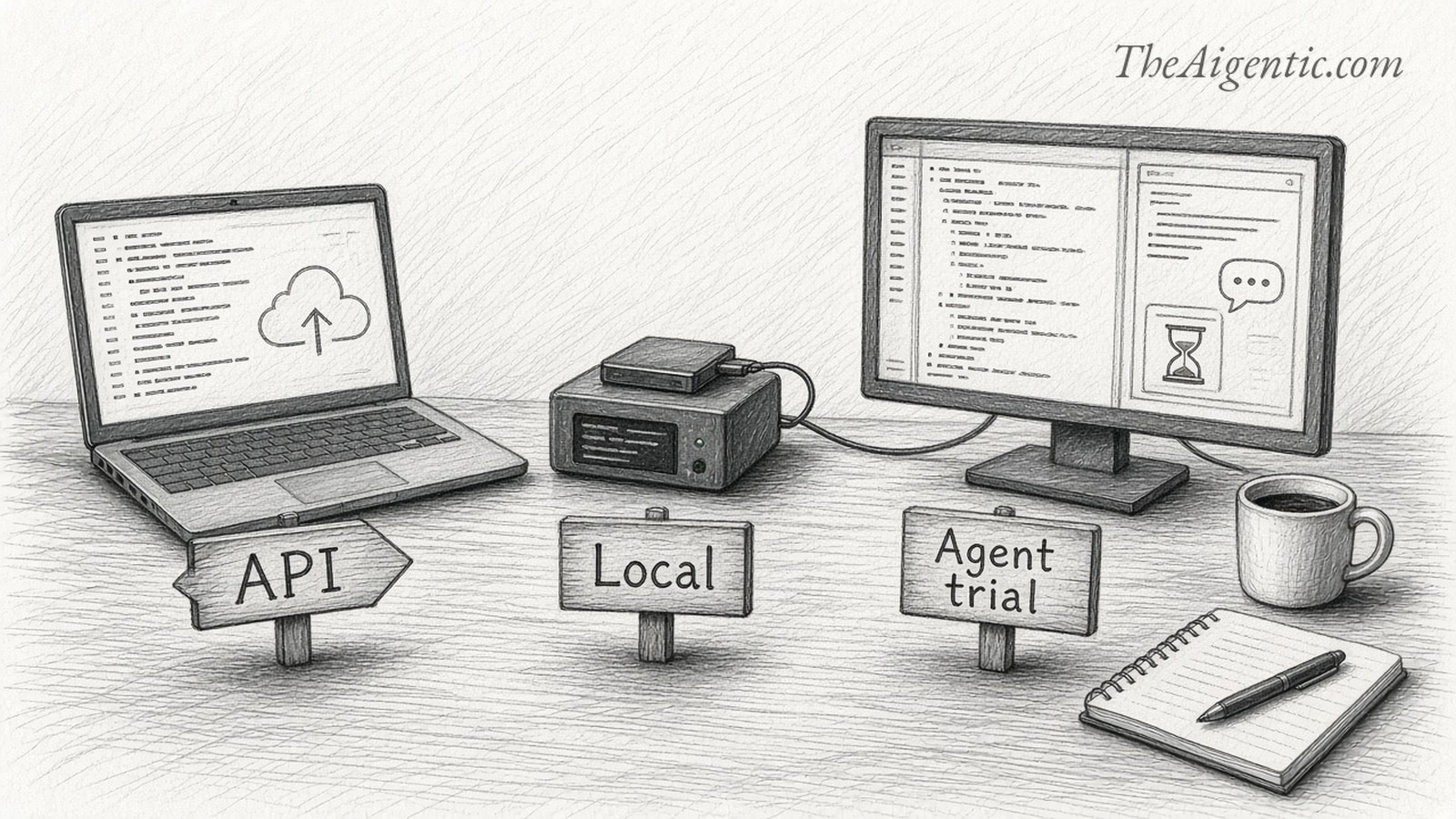
Alex Finn’s two-DGX-Spark demo makes local AI tangible: a powerful open model running on machines you control. But that setup is one end of a much wider spectrum. You can also call DeepSeek from an ordinary laptop through its inexpensive API, or try it inside a coding agent before committing to either hardware or ongoing usage.
The first decision is where you want the model to run. A desktop application can send every request to the cloud. A local inference server can feed an editor on another computer. The interface and the location of the computation are separate choices.
This guide covers all three paths using DeepSeek V4.1 Flash, including the October 17 update. On DeepSeek’s hosted API, the model name is deepseek-flash; it currently routes to V4.1 Flash-1017. 1
Watch the local setup
Alex Finn’s DGX Sparks demo. Watch on YouTube. The walkthrough below focuses on deployment and practical use.
Use the video to see what a personal AI installation can look like. When evaluating your own setup, record the checkpoint, quantization, runtime and context length. “Runs locally” alone tells you little about speed or the quality of the output.
Choose your starting point
| Route | What you need | Best first use | Main tradeoff |
|---|---|---|---|
| Local desktop | High-memory hardware, fast SSD, compatible inference software | Experiment with control over model hosting | Large downloads and setup work |
| DeepSeek API | Ordinary computer, account, API key and balance | Scripts, repeatable workflows and agents | Remote inference and usage billing |
| Qoder free allowance | Eligible individual account and supported Qoder client | Try an agent on a small coding task | Daily limits and an expiring promotion |
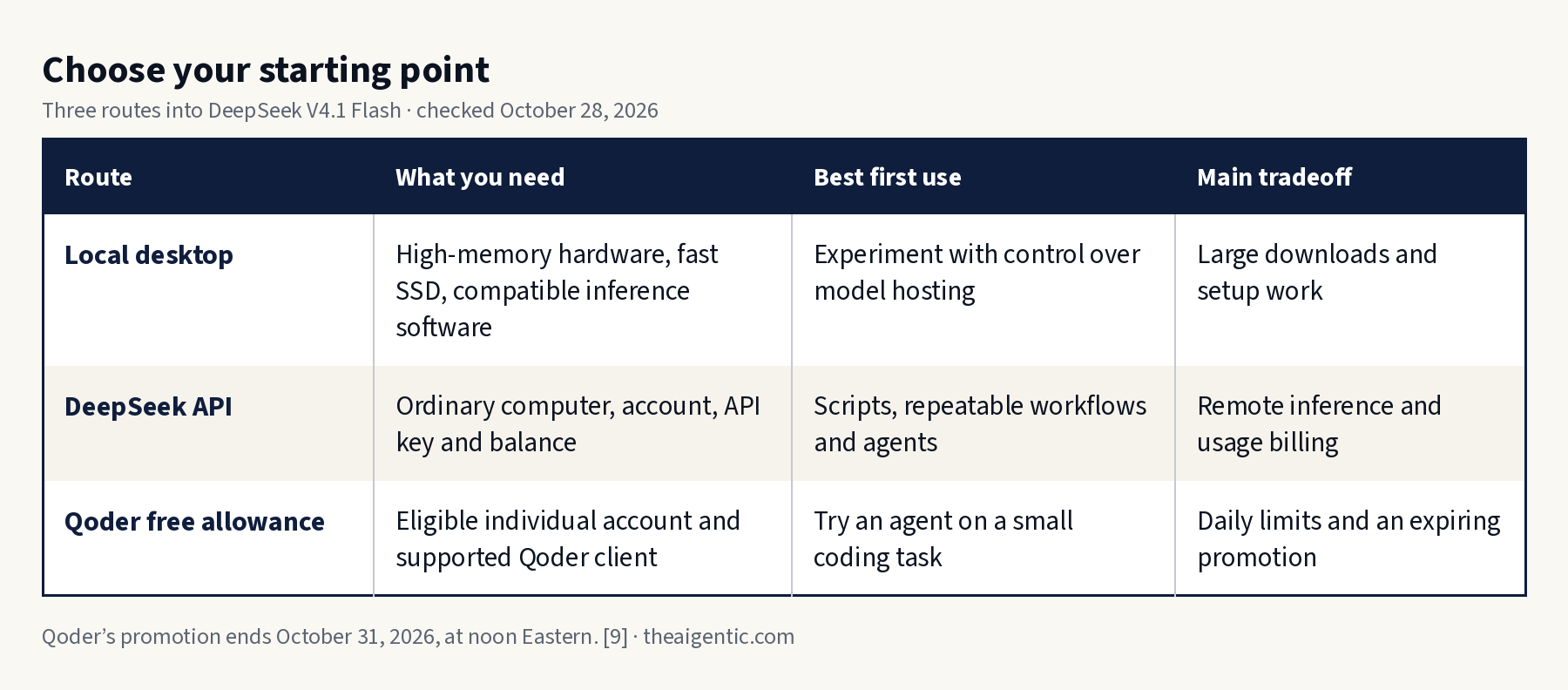
Tap to enlarge.
For a first experiment, start with the API or the free allowance. Local hosting becomes easier to judge once you know what work you want the model to perform.
Route 1: Run it on your own hardware
V4.1 Flash is a large model even though only a fraction of its parameters are active for each token. A small active parameter count does not mean the entire installation fits inside an ordinary laptop’s memory.
One community runtime, DwarfStar’s ds4, documents a Q2 build of the 1017 checkpoint with a 341 GiB download: 152 GiB of main weights plus 189 GiB of disk-backed Engram tables. Its documented starting points include a single 128GB Mac or DGX Spark using SSD streaming, or two 128GB machines for resident main weights. A 256GB-plus Mac can also accommodate the Q2 main weights in memory; the tables remain on disk. 2
Quantization reduces the precision used to store weights, lowering resource requirements with potential effects on output quality. SSD streaming lets the runtime move portions of the model from storage as needed. It makes otherwise oversized models accessible, but adds storage traffic and can reduce performance.
NVIDIA lists each DGX Spark with 128GB of unified memory, a ConnectX-7 network interface and 4TB of NVMe storage. Two machines provide 256GB in aggregate, but software must explicitly distribute inference across them; connecting a cable does not automatically combine their memory. 3
Build a small local proof of life
The following is a documented community-runtime route, rather than a turnkey installer. Install Git and the compiler and GPU-toolchain prerequisites in the project’s platform guide first. Then clone the project:
git clone https://github.com/antirez/ds4.git
cd ds4
Build for your machine, choosing one command:
make                 # Apple Silicon / Metal
make cuda-spark      # DGX Spark / CUDA
The repository documents these build targets and its local CLI. 4 Download the V4.1-specific checkpoint and start a single-machine streaming session:
./download_model.sh ds41f-q2

# 128GB Apple Silicon machine:
./ds4 -m gguf/DeepSeek-V4.1-Flash-1017-IQ2_XXS-Q2_K-imatrix.gguf \
  --ssd-streaming --ctx 32768

# DGX Spark: use the same invocation with --cuda added.
These model-specific commands come from the V4.1 guide. Allow room beyond the download for the operating system, caches and any temporary files. Keep the model on a fast local SSD. Begin with a modest context instead of trying to reproduce the hosted model’s maximum context immediately.
Ask a short question, then try a small function with known inputs and expected outputs. Confirm the startup log identifies the intended checkpoint. For a two-Spark installation, follow the runtime’s network tensor-parallel instructions for that exact model and backend; the single-machine command above is not a cluster recipe.
Connect the model to your tools
Once inference works, ds4-server can expose OpenAI- and Anthropic-compatible endpoints. Its default address is http://127.0.0.1:8000; clients using the OpenAI format generally use the /v1 base path. Select the V4.1 GGUF explicitly at startup and apply the streaming/backend settings required by your machine. The runtime’s server guide provides client configurations. 4
Keep the server on loopback for your first test. Also check the agent’s other services: local model inference does not make web search, telemetry or external tools local.
Route 2: Use DeepSeek’s API
The API removes the hardware problem. Create an account at DeepSeek Platform, obtain a key and fund the account as required. Store the key outside your code and repository.
In a Bash terminal, this reads the key without displaying it or placing its literal value in shell history:
read -r -s -p "DeepSeek API key: " DEEPSEEK_API_KEY
echo
export DEEPSEEK_API_KEY
Make a short request:
curl --fail-with-body https://api.deepseek.com/chat/completions \
  -H "Authorization: Bearer ${DEEPSEEK_API_KEY}" \
  -H "Content-Type: application/json" \
  -d '{
    "model": "deepseek-flash",
    "messages": [{
      "role": "user",
      "content": "Write a Python function that computes a weighted mean. Include three tests."
    }],
    "thinking": {"type": "disabled"},
    "max_tokens": 1024,
    "stream": false
  }'
DeepSeek documents the endpoint, model alias and compatible request format; its thinking-mode control lets you choose direct answers or reasoning. 1 5 A successful response contains the answer under choices[0].message.content. Inspect the usage fields as well as the generated code.
What the token bill looks like
| Per million tokens | Peak | Off-peak |
|---|---|---|
| Uncached input | $0.30 | $0.15 |
| Cached input | $0.006 | $0.003 |
| Output | $1.20 | $0.60 |
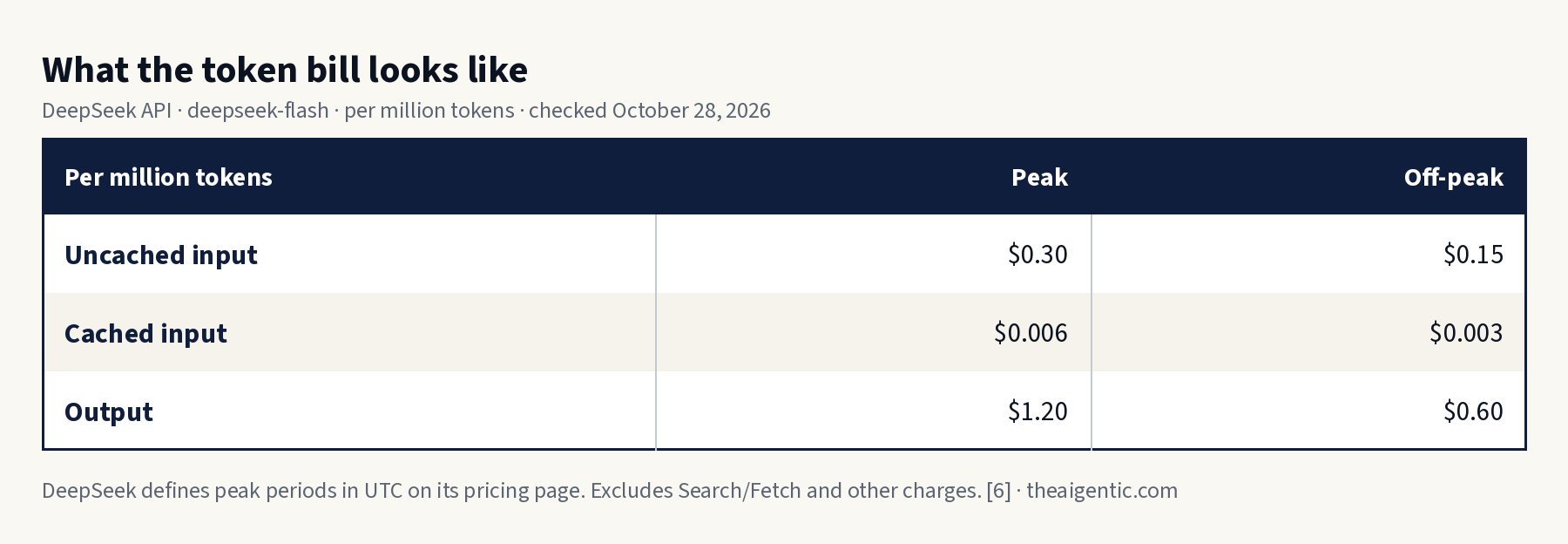
Tap to enlarge.
At those rates, 100,000 uncached input tokens and 20,000 output tokens cost about 5.4 cents at peak or 2.7 cents off-peak, before tools or other charges. That is illustrative arithmetic, not a measured coding-task cost. Reasoning and repeated attempts can increase consumption. DeepSeek defines peak periods in UTC on its pricing page. 6
For an existing coding agent, use DeepSeek’s integration directory and follow the instructions for that client. A successful chat request establishes connectivity; it does not establish that the agent’s tool loop is configured correctly.
Add live information with Search and Fetch
Search finds pages; Fetch retrieves a page as Markdown. They are separate API calls, authenticated with the same DeepSeek key. A normal chat request does not automatically run them. Your application must pass their results to the model, or use an agent integration that handles that loop. 7
curl --fail-with-body https://api.deepseek.com/v1/tools/search \
  -H "Authorization: Bearer ${DEEPSEEK_API_KEY}" \
  -H "Content-Type: application/json" \
  -d '{"query":"DeepSeek API pricing site:api-docs.deepseek.com","count":3}'

curl --fail-with-body https://api.deepseek.com/v1/tools/fetch \
  -H "Authorization: Bearer ${DEEPSEEK_API_KEY}" \
  -H "Content-Type: application/json" \
  -d '{"url":"https://api-docs.deepseek.com/quick_start/pricing/"}'
Read the Search response’s results array and Fetch response’s content. Supply the relevant text and source URLs with your next model request, asking it to distinguish source material from its own conclusions.
Each endpoint costs $0.75 per 1,000 successful, nonempty requests. One search plus three page fetches therefore costs $0.003, before model tokens. Failed and empty requests are not billed. 7
There is a separate temporary benefit: server-side Search/Fetch calls through DeepSeek Harness, Claude Code and Codex are free for DeepSeek API users until October 31, 2026, at noon Eastern—16:00 UTC. This does not make model inference free, and the stated benefit should not be generalized to every standalone API call. 8
Route 3: Try a coding agent with a free allowance
Qoder International currently offers a daily free allowance for DeepSeek-Flash, including individual Free accounts. Its documentation identifies the model as V4.1 Flash-1017 and says the promotion ends November 1 at 00:00 Singapore time: October 31, 2026, at noon Eastern. Teams and Enterprise subscriptions are excluded. 9
- Download a supported Qoder client from Qoder and sign in to an individual account.
- Open a small project you can inspect and test.
- Select DeepSeek-Flash explicitly in the model selector.
- Confirm the displayed promotional rate is 0.0×, then submit one bounded task.
No separate claim is required. The daily allowance is limited; paid accounts receive more uses, and continued use after the allowance is exhausted can consume Credits. Check the client before continuing. This is temporary hosted access, rather than free local inference or a permanent free API tier. 9
Give every route the same practical test
Start with something whose correctness you can check. A useful first task is a single-file calculator with no external dependencies:
Build a single HTML file that calculates a weighted average from editable rows of values and weights. Handle blank inputs and reject negative weights. Include a worked example and explain how to verify the result. Do not add external libraries.
Check an example yourself: values 10 and 20 with weights 1 and 3 should produce 17.5. Then try zero total weight, an empty row and a negative weight. Ask the agent to repair any failure and count the extra attempts.
Record the model version, quantization where applicable, time to a working result, required corrections and total usage cost. For local hardware, record memory pressure and storage behavior too. Those observations are more useful than whether the first response looked polished.
If authentication fails, check the key and endpoint before changing the prompt. If local inference runs out of memory, reduce context and follow the runtime’s streaming guidance. If the trial is slow or unavailable, check the daily allowance and promotion status.
The free agent allowance is a quick way to explore the workflow. The API offers a straightforward path to repeatable jobs. Local deployment offers control over hosting, with a larger operational commitment. Choose the route that lets you test useful work today, then let the results determine whether to invest further.
Method: This is a documentation-based setup walkthrough, not a report of a hands-on hardware benchmark or a paid API test. Local commands depend on the current runtime and platform prerequisites. The embedded video plays through YouTube and may be subject to its availability and embed settings.
Sources and setup references
- DeepSeek: first API call and agent integrations
- DwarfStar: V4.1 model files and hardware paths
- NVIDIA: DGX Spark specifications
- DwarfStar runtime repository and server configuration
- DeepSeek: thinking mode
- DeepSeek: current pricing
- DeepSeek: Search and Fetch
- DeepSeek: October 17 release and tool promotion
- Qoder: free allowance terms
- Alex Finn: DGX Sparks video